WhatsApp and Instagram
Connect WhatsApp (QR code or official API), Instagram and email accounts, and choose what happens on first connection.
What it is for
This is where you connect the channels Omni talks through: WhatsApp, Instagram Direct and email accounts. The screen opens from Settings › Service.
Before you start
- Have the business WhatsApp phone at hand, online.
- For Instagram, the business account (username and password).
- For the official API, a Meta business account, an access token, a public HTTPS address for the webhook and approved templates. Meta charges per message.
- WhatsApp Web and Instagram are not official channels for automation: keep Safe sending on.
Step by step
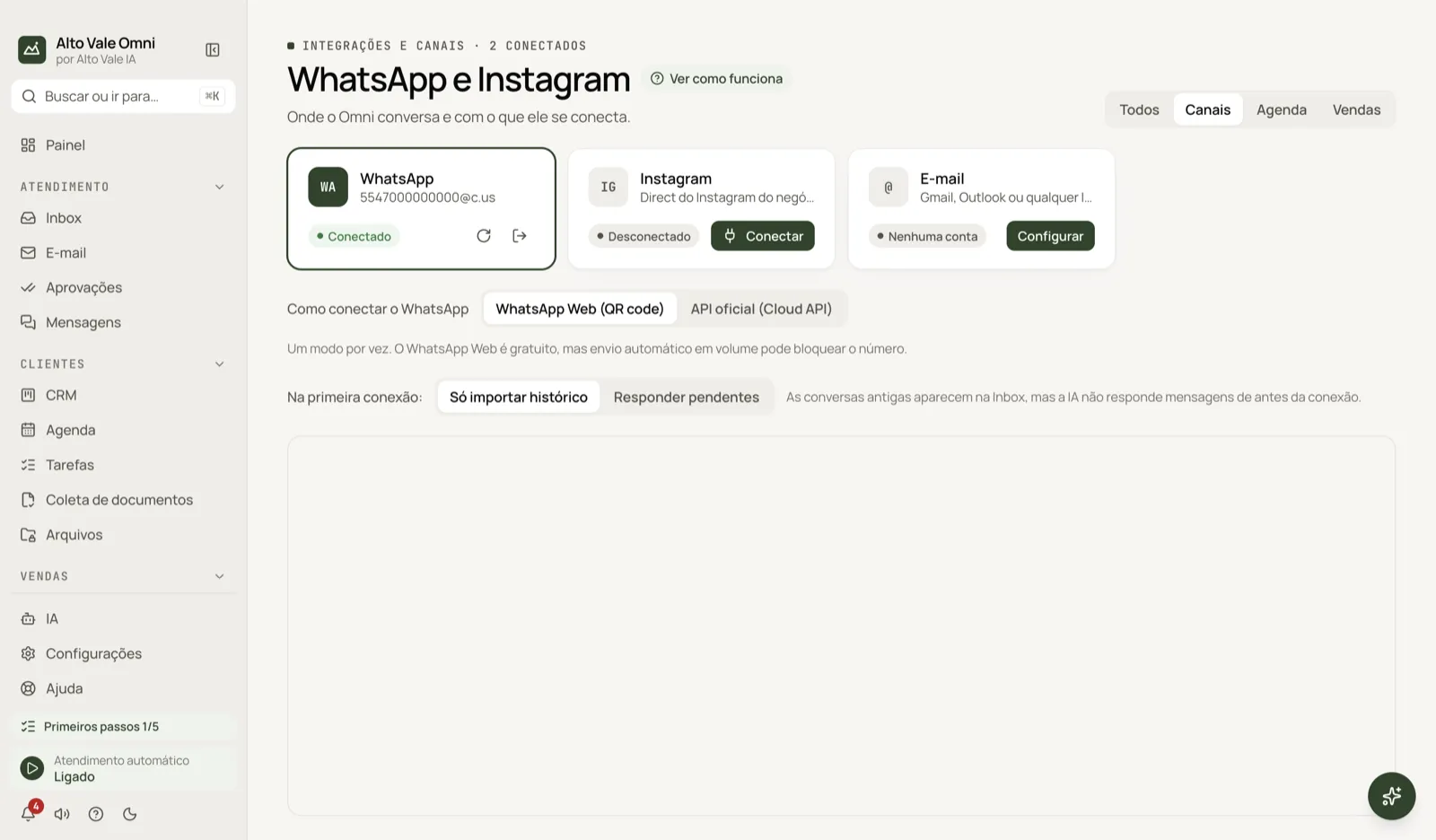
- Open Settings › Service › WhatsApp and Instagram.
- On the WhatsApp card, click Connect.
- On the phone, open WhatsApp › Linked devices › Link a device and scan the QR code.
- On the Instagram card, click Connect and sign in with the business account.
- Choose what to do On first connection and check the card shows Connected.
All actions on the screen
Filters All, Channels, Agenda and Sales
Separate the cards: conversation channels, external calendars (Google, Apple, Outlook through CalDAV or ICS) and the order portal.
WhatsApp › Connect, Reload and Disconnect
Connect shows the QR code. The reload icon reopens the connection if it gets stuck. The exit icon disconnects and deletes the session on this computer (the app asks first). Example: Clínica Bem Viver's phone got a new SIM, so Marina Souza disconnects and scans the QR again.
How to connect WhatsApp
Choose WhatsApp Web (QR code), free but at risk of blocking if you send a lot, or Official API (Cloud API). One mode at a time. The official API has a step-by-step with Meta credentials, Test connection, webhook, template mapping and alerts. Outside the 24-hour window only an approved template can go out.
On first connection
Only import history: old conversations appear in the Inbox, but the AI does not answer anything from before the connection. Reply to pending: the AI answers recent messages that are still unanswered.
Instagram › Connect
Signs in with the business Instagram account so Omni can read and answer Direct. Sending files through Instagram is not supported yet; text works normally. Profile analysis lives in Instagram.
Email › Set up
Add accounts (Gmail, Outlook or any IMAP) with Add account and Test connection. They feed the Email menu.
Agenda and Sales
Connect external calendars and the order portal. Example: Dr. Paula's Google calendar shows up next to the appointments.
Conversations (bulk actions)
Finish all conversations closes everything that is open, without sending a message. Clear conversations deletes conversations and messages from this computer (WhatsApp and Instagram are not affected) and cannot be undone.
Shortcuts
- ⌘, opens Settings; ⌘K the palette; F1 Help.
Common problems
WhatsApp disconnected. Click Connect and scan the QR again. Check the phone has internet.
The QR code does not appear. Use the reload icon and wait a few seconds.
Instagram asks you to sign in all the time. Sign in again and avoid opening the same account on another computer at the same time.
The AI is not answering. A provider may be missing under AI, or automatic service may be paused.
See also
Screen in the app: /channels · In the app, press F1 on this screen to open this guide.
Still have a question?
Talk to the Alto Vale IA team on WhatsApp. Tell us the app, the screen and what happened.