AI agent
Define who the AI that serves customers is: name, tone, what it knows, what it must never do and how you train it.
What it is for
On the AI screen you teach and configure the AI that serves your customers. This guide covers the Train, Agent and Knowledge tabs. Connecting to an AI provider is in AI: providers and connection.
Before you start
- Turn on at least one AI in AI › AI connection. Without it, the Train tab shows "The AI is not turned on yet" with a Turn on the AI button.
- Have the clinic's prices, hours and rules at hand to answer the interview.
Step by step
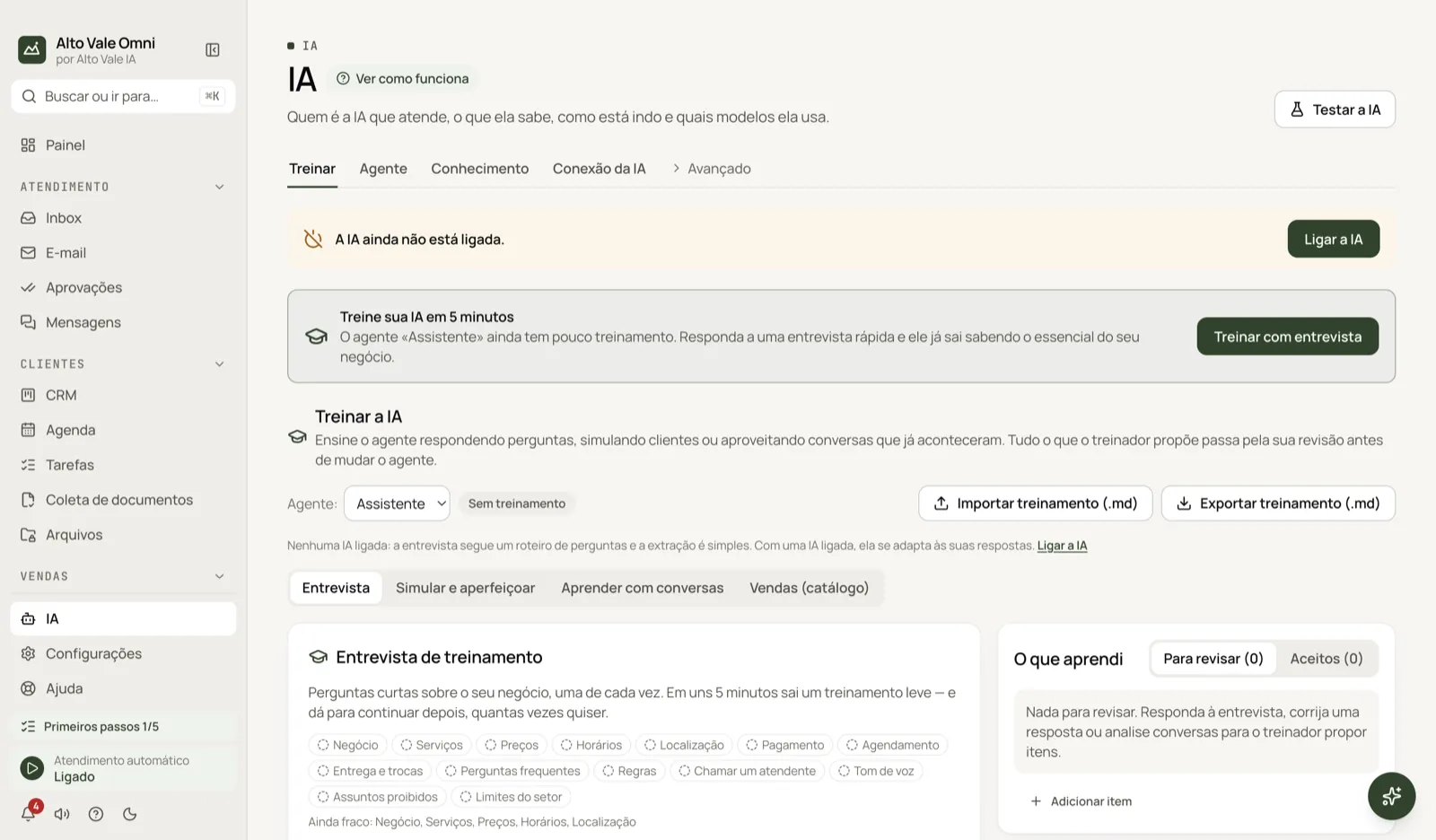
- Open AI in the menu and start with Train › Interview.
- Answer the questions: the AI proposes items (prices, rules, frequent questions). Accept or discard each one.
- Open the Agent tab and set the name and tone.
- In Knowledge, upload PDFs, spreadsheets or website pages the AI may consult.
- Click Test the AI (top right) and chat as if you were a customer, without sending anything to anyone.
All the actions on the screen
Train › Interview
The AI asks about the business. Example: Clínica Bem Viver says a cleaning costs R$ 150, whitening R$ 890 and that Dr. Paula sees patients Tuesday to Saturday.
Train › Simulate and improve
The AI plays a customer and answers; you correct what you dislike. Example: Ana Ribeiro asks "does whitening hurt?" and you adjust the tone of the answer.
Train › Learn from conversations
Pick up to 20 conversations and click Analyse selected. The trainer proposes frequent questions, examples and tone of voice from what your team replied (personal data is masked). Example: select the conversations where Marina Souza answered about Unimed coverage.
Train › Sales (catalog)
Builds sales arguments and answers from the Catalog. Example: how to present the R$ 890 whitening to someone who only asked about cleaning.
Agent › name and tone
The Name and How the AI should behave fields. Example: name "Bem Viver assistant", warm tone, never promising clinical results.
Agent › Business information and reply language
Facts the AI always knows. The language can be Same as customer, Portuguese, English or Spanish.
Agent › Creativity
A control between More faithful and More creative. For prices and hours, keep it faithful.
Agent › Advanced
Show the advanced options opens customer memory, allowed documents, tools and the safety rules (for example Answer only with what is in your documents, which prevents invented data). Example: turn on memory so the AI remembers that Carlos Menezes prefers afternoon appointments.
Agent › New agent, Make default, Delete
You can have more than one agent. Example: one for reception and another for billing; the Default one answers when no rule picks another. Discard changes goes back to the last saved version.
Knowledge
PDFs, spreadsheets, texts and website pages the AI consults, citing its sources. Example: the whitening price list as a PDF.
Test the AI
A test chat. Example: ask "how much is a cleaning?" and check that it answers R$ 150.
Shortcuts
- ⌘J opens the Assistant for questions.
- In the Inbox, Tab accepts the AI suggestion and ✨ asks for another.
Common problems
The AI makes things up. Turn on Answer only with what is in your documents and check Knowledge.
The Train tab asks you to turn the AI on. Do it in AI › AI connection.
The AI didn't reply to a customer. See Troubleshooting.
See also
Screen in the app: /ai · In the app, press F1 on this screen to open this guide.
Still have a question?
Talk to the Alto Vale IA team on WhatsApp. Tell us the app, the screen and what happened.