Overview
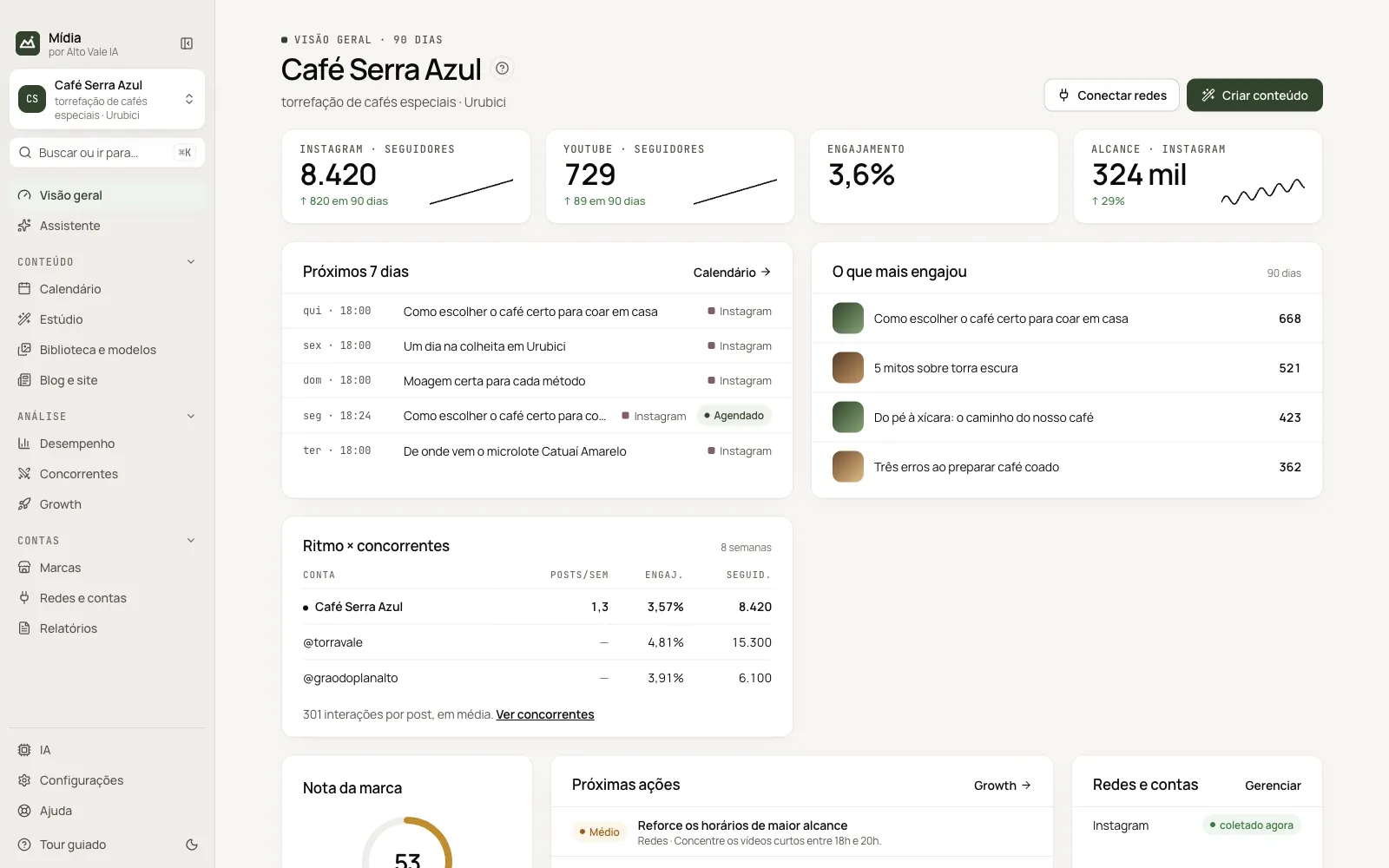
The brand's dashboard: 90-day numbers, the next 7 days, what engaged the most, pace against competitors and what needs you.
What it is for
It is the app's first screen. For the active brand, it shows how the account is doing and what to do next: numbers for the last 90 days, what is scheduled, the posts that engaged the most and how your pace compares with the competitors'.
Before you start
- Choose the brand on the card at the top of the menu.
- Connect at least one network in Redes e contas (Networks & accounts) (see Connect the networks). With no network connected, the screen shows a notice with the Conectar as redes (Connect the networks) button.
Step by step
- Open Visão geral (Overview) in the menu.
- Read the four number blocks at the top (followers, engagement, reach).
- See in Próximos 7 dias (Next 7 days) what goes out this week and in O que mais engajou (What engaged the most) what to repeat.
- Follow the Próximas ações (Next actions) and the Primeiros passos (First steps) until you complete them all.
All the actions on the screen
Conectar redes (Connect networks)
Opens Redes e contas. Example: at Café Serra Azul, click Conectar redes, choose Instagram's card and sign in to the brand's account.
Criar conteúdo (Create content)
Opens the Estúdio (Studio). Example: click Criar conteúdo and ask for "Como escolher o café certo para coar em casa".
Todas as marcas (All brands)
Appears when there is more than one brand. Opens the summary of all of them on one screen.
Number blocks (followers, engagement, reach)
Each block shows the value, the change and a trend line. Example: "Instagram · Seguidores 8.420, ↑ 820 em 90 dias".
Calendário → (Calendar →)
On the Próximos 7 dias card, takes you to the Calendar. Example: the post "Moagem certa para cada método" on Thursday, 18:00, appears with the Agendado (Scheduled) badge.
O que mais engajou (What engaged the most)
Lists the posts with the most likes and comments. Example: "Como escolher o café certo…" with 668 interactions.
Ritmo × concorrentes (Pace × competitors)
Compares posts per week, engagement and followers. Ver concorrentes (View competitors) opens the Competitors screen.
Primeiros passos (First steps)
List of what is missing to get started. Click a row to go straight to that step's screen. The × hides the card.
Nota da marca, Próximas ações and Redes e contas (Brand score, Next actions and Networks & accounts)
They show the overall score, the highest-impact recommendations (Growth → opens all of them) and the status of each account (Gerenciar, Manage).
"?" button
Next to the title, opens this screen's tour.
Shortcuts
- ⌘K / Ctrl+K: search screens and actions.
- F1: open this guide.
Common problems
The numbers do not appear. They have not been collected. In Redes e contas, click Gerenciar → Coletar (Manage → Collect) on the network's card.
"login expirado" (login expired) appears. Sign in to the network again in Redes e contas.
See also
Screen in the app: / · In the app, press F1 on this screen to open this guide.
Still have a question?
Talk to the Alto Vale IA team on WhatsApp. Tell us the app, the screen and what happened.