Growth and AI-made content
Recommendations by impact and effort, what is worth boosting and content generated on request by the AI.
What it is for
Know what to do to grow: recommendations from the analyses, posts worth boosting and content generated on request.
Before you start
Collect the metrics and run Analisar (Analyze) in Performance.
Step by step
Recommendations
After collecting the metrics, click Analisar (Analyze) in Desempenho (Performance). The AI compares the numbers and points out opportunities: posting frequency, formats that engage most, drops in reach and posts worth boosting. They appear in Growth → Prioridades (Growth → Priorities), sorted by impact and effort, and the highest-impact ones also show in the Visão geral (Overview).
Each recommendation has Criar com IA (Create with AI), which generates the right content for it (for example, a 30-day calendar for low posting frequency). Mark it as resolvida (resolved) or ignorada (ignored) when appropriate.
Ask for content
In Growth → Conteúdos gerados (Growth → Generated content), choose the type and describe the request:
- post captions;
- carousel script;
- short video script (Reels, TikTok, Shorts);
- profile bios;
- content calendar (30 days);
- blog post;
- replies to comments;
- what to boost.
The AI uses the brand's registration and the posts that engaged the most. Always review before publishing. The Assistente (Assistant, ⌘J) also generates content in a conversation.
All the actions on the screen
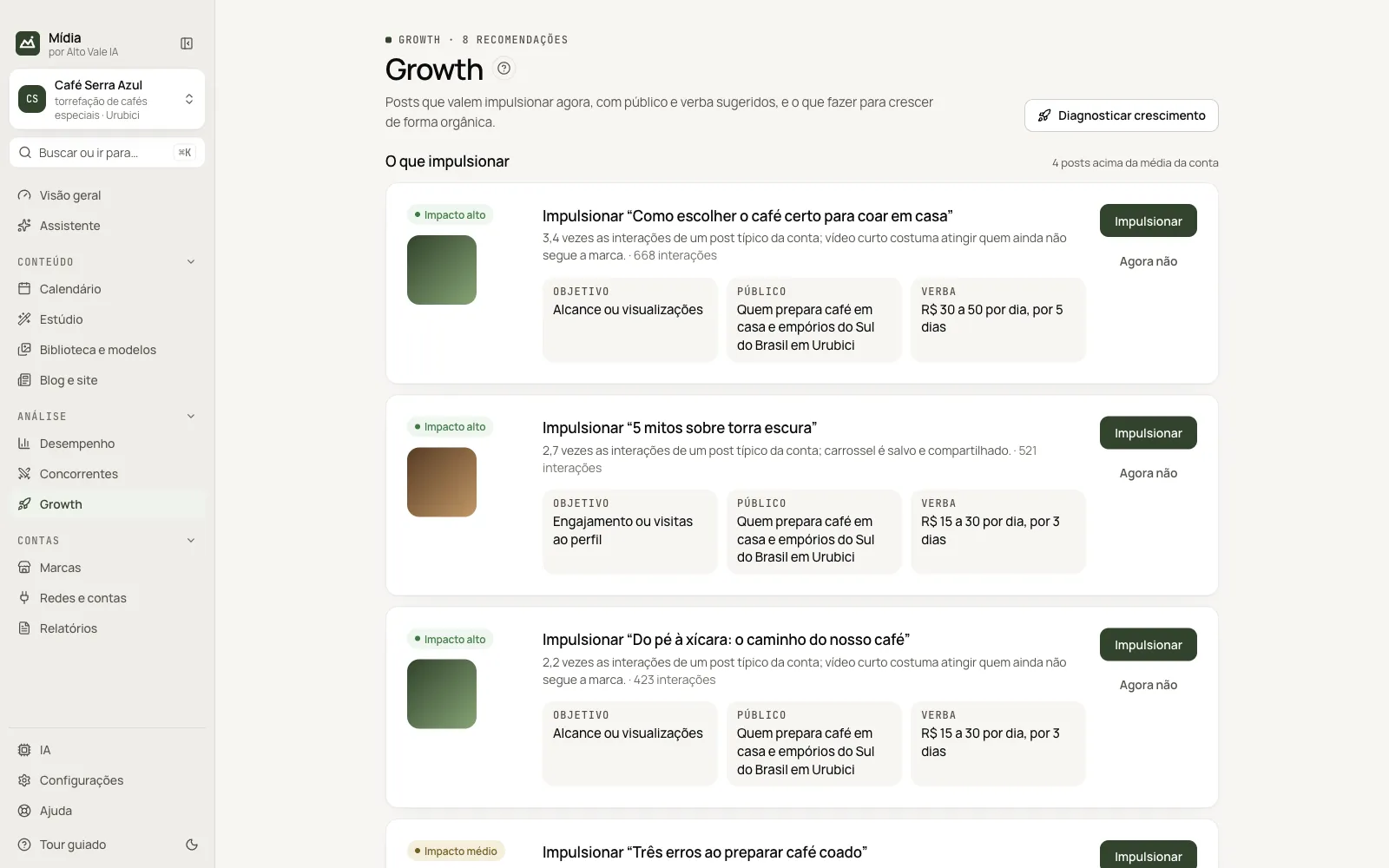
Diagnosticar crescimento (Diagnose growth)
Without AI, it points out what the numbers support (days without posting, formats that engage). Example: "You post less than your competitors".
Impulsionar (Boost)
On the card of an above-average post, shows the step by step and copies the summary (goal, audience and budget) so you can create the ad on the network. Example: "Boost 'How to choose the right coffee'", goal Reach, budget R$ 15 to 30 per day.
Agora não (Not now)
Hides the card for this session.
Prioridades / Todas as recomendações / Conteúdos gerados tabs (Priorities / All recommendations / Generated content)
Prioridades sorts by impact and effort; the second filters by area and status; the third has Pedir um conteúdo à IA (Ask the AI for content: type, details and Gerar, Generate).
Criar com IA, Marcar resolvido, Ignorar (Create with AI, Mark resolved, Ignore)
On each recommendation: generates the right content, closes it or dismisses it. Example: Criar com IA on a low-frequency alert generates a 30-day calendar.
Shortcuts
Right-clicking a recommendation opens the same actions.
Common problems
"Nenhuma recomendação ainda" (No recommendations yet). Collect the metrics and click Analisar in Desempenho.
See also
Screen in the app: /growth · In the app, press F1 on this screen to open this guide.
Still have a question?
Talk to the Alto Vale IA team on WhatsApp. Tell us the app, the screen and what happened.