Competitors
Public Instagram profiles side by side with the brand: pace, engagement, best posts and tips.
What it is for
See what competitors do and what works for them, to decide what to test.
Before you start
Register the competitors (with their Instagram @) in Brands or use Adicionar concorrente (Add competitor), and connect the brand's Instagram.
Step by step
Competitors
Register the competitors with their Instagram @ in Marcas (Brands), or use Adicionar concorrente (Add competitor): type a few keywords (products, services, niche) and, if you like, the region. The AI suggests real competitors, the app checks that each one's website responds, and you tick who goes into the registration. Only those with an Instagram @ are read on this screen. In Concorrentes (Competitors), Ler concorrentes (Read competitors) opens each public profile with the brand account's session and saves followers, frequency, formats, times and the posts that engage the most. After that, the reading repeats once a week.
To protect the account, each profile is read at most once a day, one at a time and with pauses. If Instagram asks for a verification, reading stops and the account stays pending until you complete it. The app only stores the profiles' public data and never the follower list. For now, Instagram only.
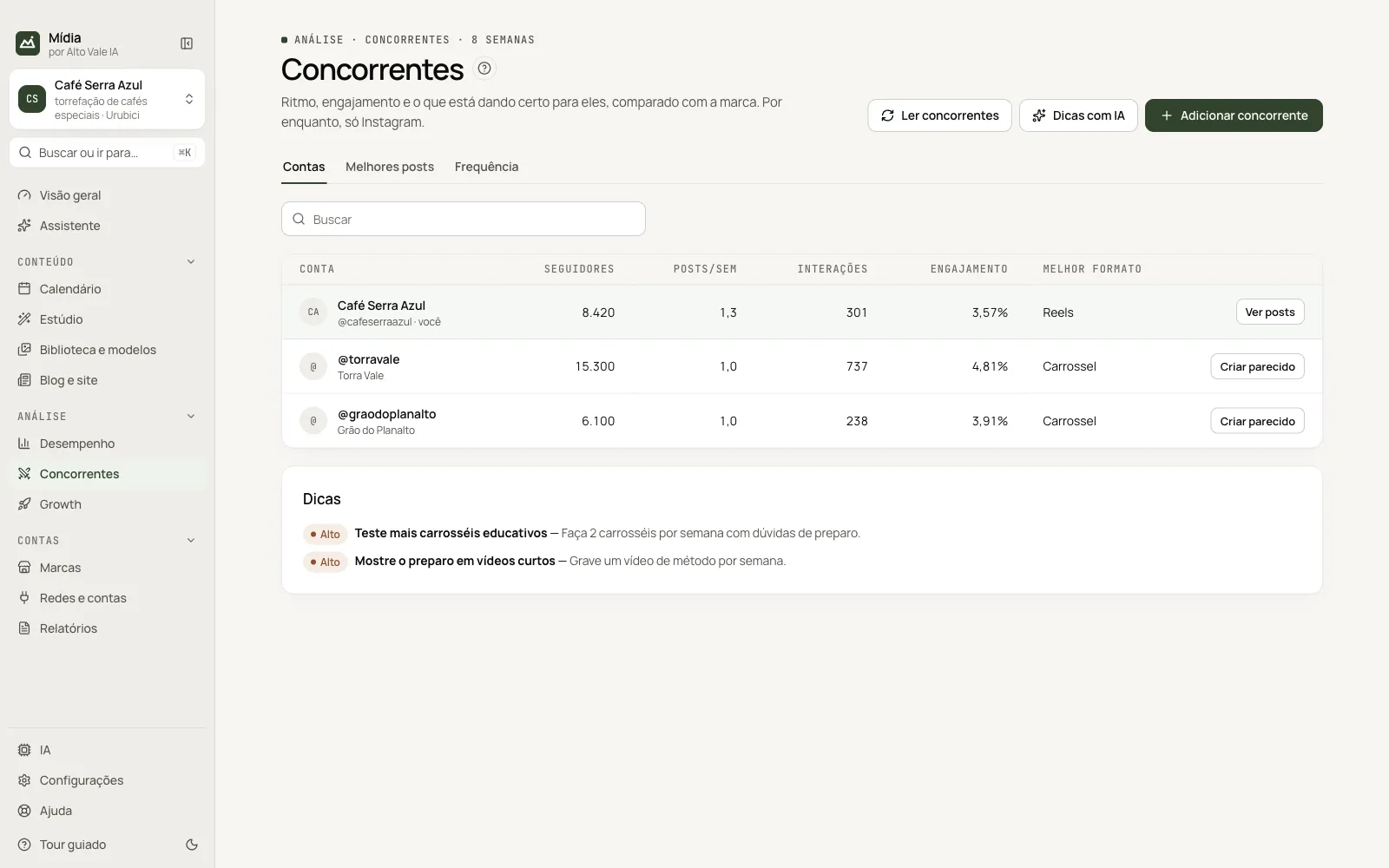
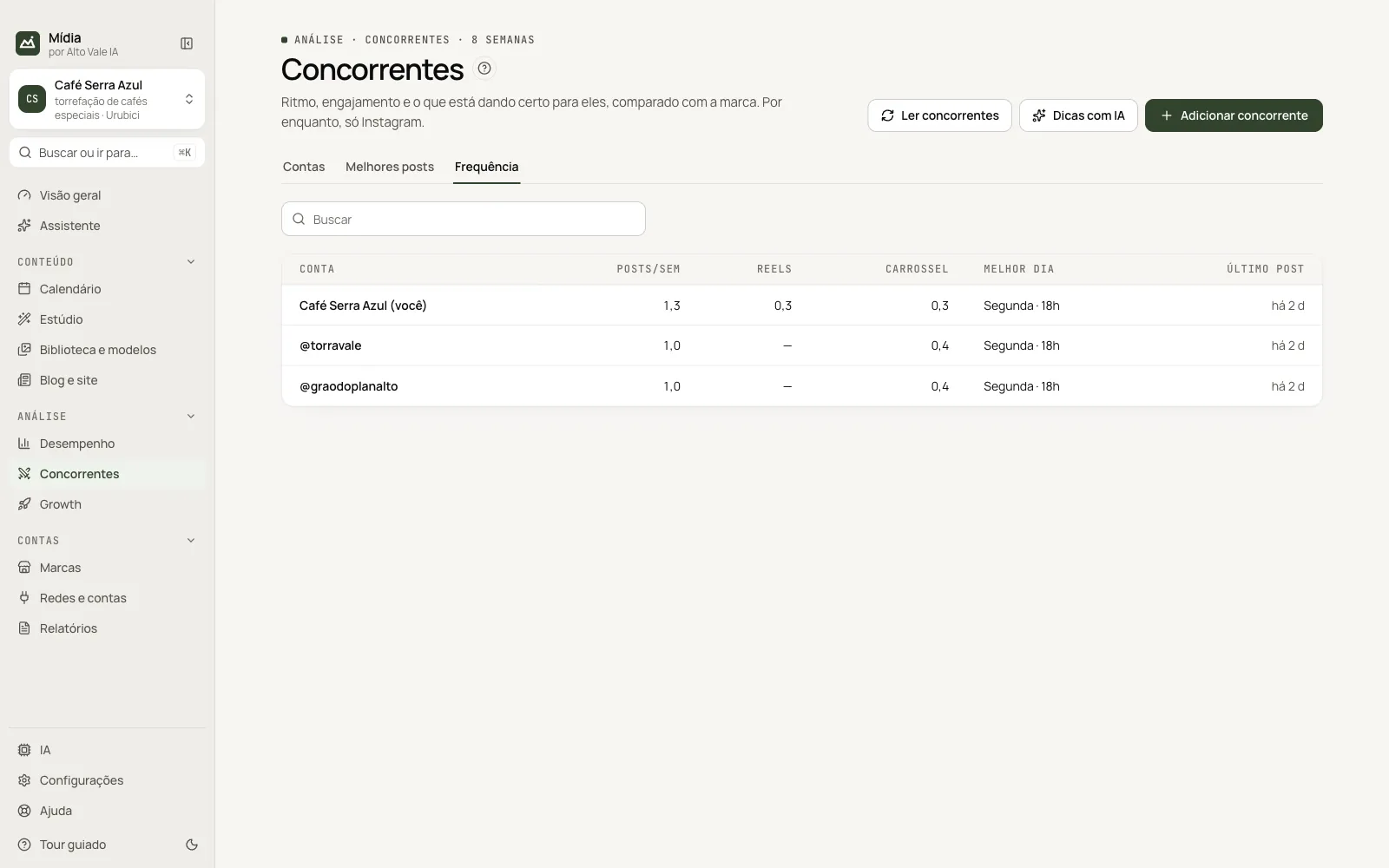
The screen has three tabs: Contas (Accounts, the table side by side with the brand), Melhores posts (Best posts) and Frequência (Frequency: posts per week, best time and last post).
- Dicas com IA (AI tips) compares the brand with the competitors and suggests what to test.
- Criar parecido (Create something similar) opens the Studio with the post's subject. The idea is to take inspiration: the AI is instructed not to copy texts.
All the actions on the screen
Adicionar concorrente (Add competitor)
The AI suggests real competitors by keywords and region; you tick who goes in. Example: "specialty coffee, roastery, Urubici".
Ler concorrentes (Read competitors)
Reads the public profiles, one per day per profile. Example: read every Monday.
Dicas com IA (AI tips)
Compares the brand with the competitors and suggests what to test. Example: "Test more educational carousels".
Contas tab (Accounts)
Table with followers, posts per week, interactions, engagement and best format; Ver posts (View posts) and Criar parecido (Create something similar).
Melhores posts tab (Best posts)
The posts with the most interactions; Criar parecido opens the Studio with the subject (the AI does not copy the text).
Frequência tab (Frequency)
Posts, Reels and carousels per week, best day and how many days ago each account posted.
Shortcuts
Right-clicking a post opens Criar parecido, Abrir o post (Open the post) and Copiar (Copy).
Common problems
Private profile. Posts from private accounts cannot be read.
See also
Screen in the app: /competitors · In the app, press F1 on this screen to open this guide.
Still have a question?
Talk to the Alto Vale IA team on WhatsApp. Tell us the app, the screen and what happened.