Calendar
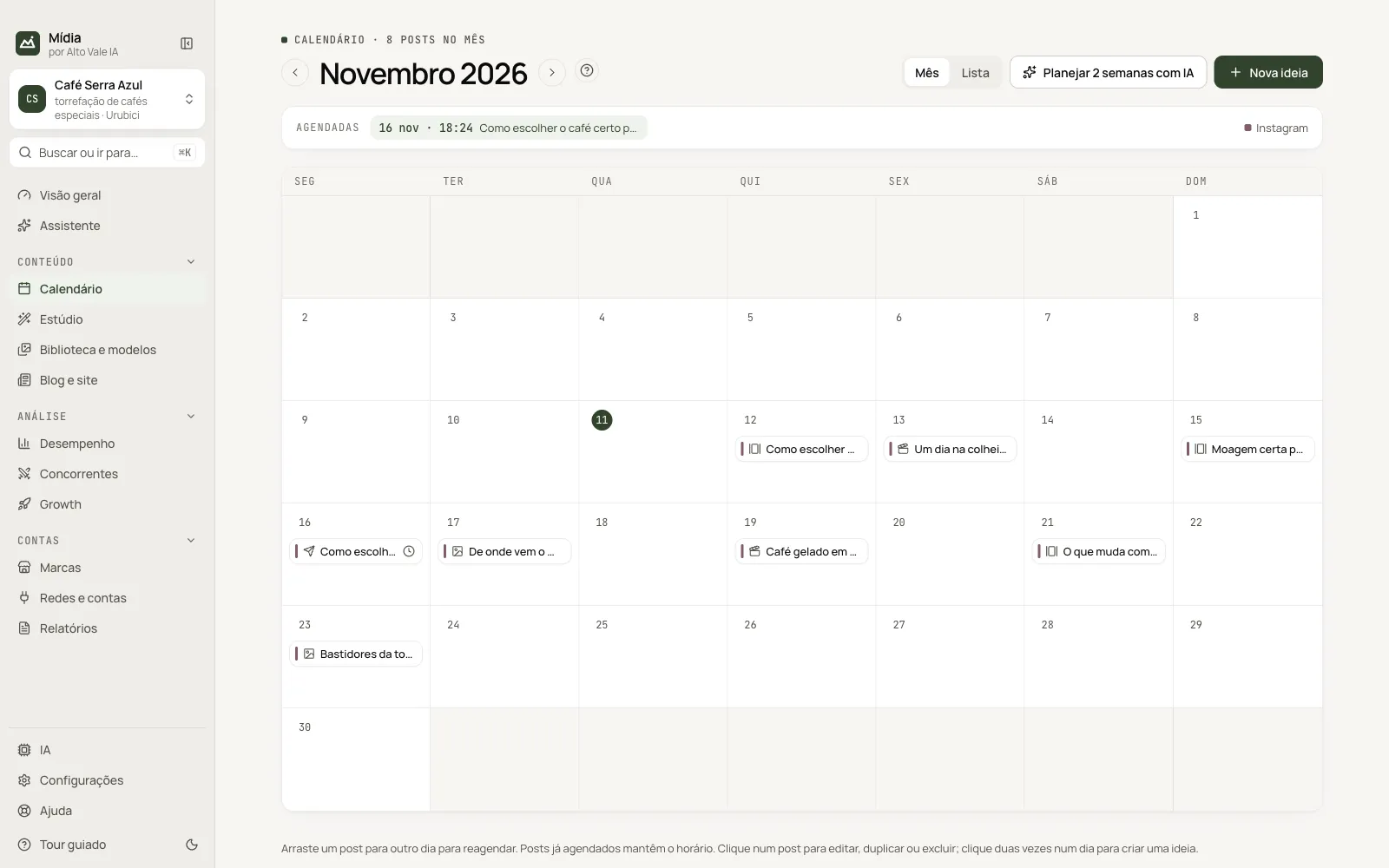
The month with the brand's ideas and posts: drag to reschedule, plan 2 weeks with AI and follow the queue.
What it is for
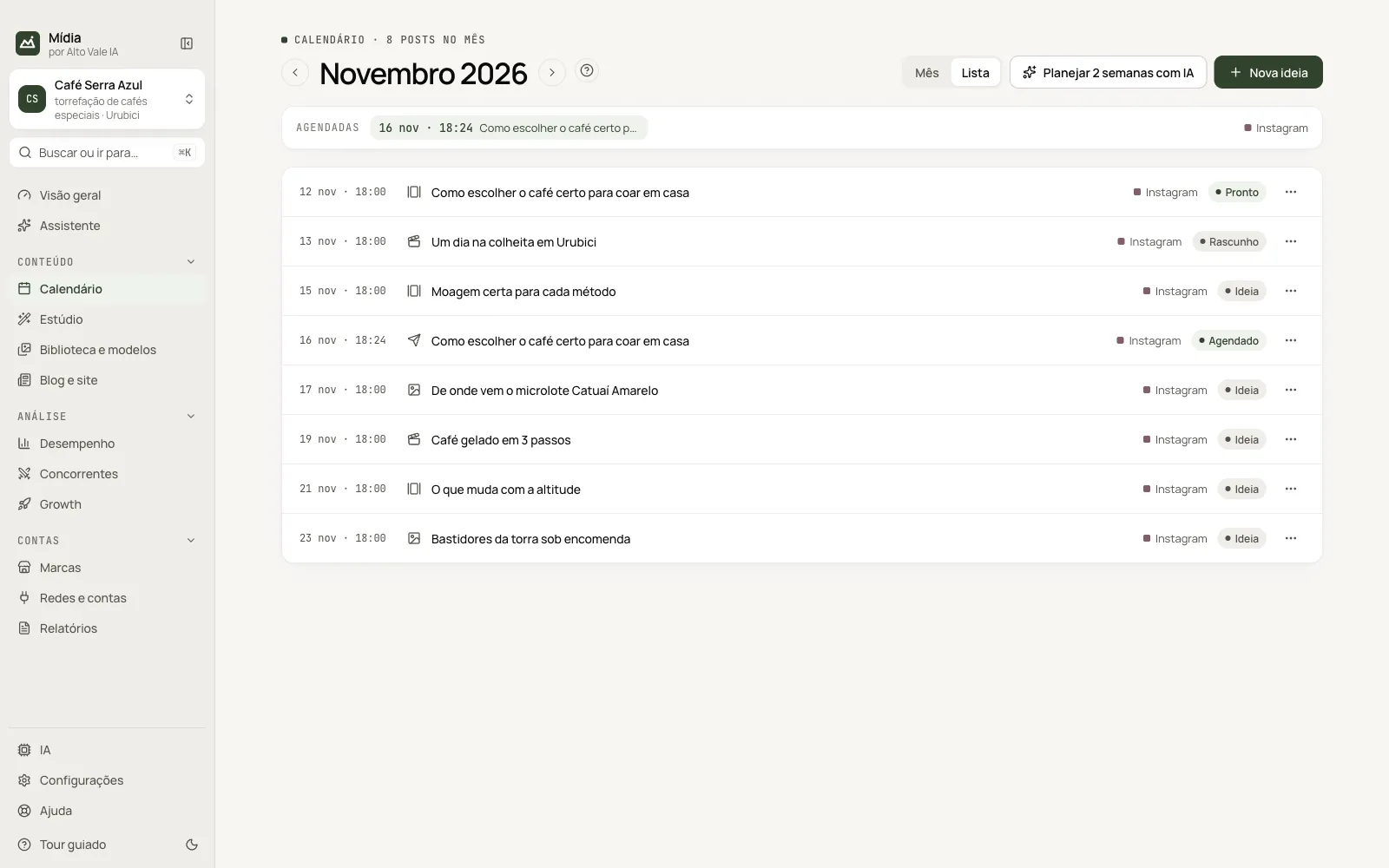
Plan content day by day. The month shows the ideas (still without artwork) and the scheduled posts; the Lista (List) shows the queue with each item's status.
Before you start
- For the AI plan, connect an AI (see Set up the AIs).
- To really schedule, the content comes from the Studio (see Publish and schedule).
Step by step
- Open Calendário (Calendar). It opens on the current month.
- Click Planejar 2 semanas com IA (Plan 2 weeks with AI) or Nova ideia (New idea).
- Drag each item to the right day.
- Click the item to create it in the Studio, edit, duplicate or delete.
All the actions on the screen
Month arrows
Go back and forward through the months. Example: from "Novembro 2026" to "Dezembro 2026" to plan Black Friday.
Mês / Lista (Month / List)
Switches the view. The Lista shows date, format, title, network and status (Ideia, Rascunho, Pronto, Agendado, Publicado: Idea, Draft, Ready, Scheduled, Published) for each item of the month.
"Agendadas" strip (Scheduled)
Shows the upcoming posts. Example: "13 nov · 10:40 Guia do café coado".
Nova ideia (New idea)
Opens the window with Tema (Topic), Formato (Format), Rede (Network), Dia (Day), Horário (Time) and Notas (Notes). Example: topic "Receita: café gelado", format Foto (Photo), network Instagram, day 21.
Planejar 2 semanas com IA (Plan 2 weeks with AI)
The AI builds up to 3 posts per day, on the brand's pillars. AI ideas not yet used are replaced in a new plan; what you created or edited stays.
Arrastar para reagendar (Drag to reschedule)
Drop an item on another day. An idea changes date; a scheduled post keeps its time. Example: drag "5 mitos sobre torra escura" from 17 to 19.
Click the item (or "⋯" in the List)
Opens the menu: Criar no Estúdio (Create in Studio), Editar ou reagendar (Edit or reschedule), Duplicar (Duplicate), Marcar como… (Mark as…), Copiar tema (Copy topic) and Excluir (Delete) (ideas); Publicar agora (Publish now), Reagendar (Reschedule, exact date and time), Já publiquei (I already published), Tentar de novo (Try again), Abrir o post (Open the post) and Cancelar publicação (Cancel publishing) (posts).
Double-click on the day (or "+")
Creates an idea right on that day.
Shortcuts
Right-click (or Shift+F10 with the item focused) opens the same menu.
Common problems
"Passou da hora" (Past the time). The app was closed at the scheduled time. Use Publicar agora or Reagendar.
The plan does not appear. Wait a few moments: the AI builds it in the background and notifies you when it finishes.
See also
Screen in the app: /calendar · In the app, press F1 on this screen to open this guide.
Still have a question?
Talk to the Alto Vale IA team on WhatsApp. Tell us the app, the screen and what happened.