Connect the networks
Sign in to each network in an app window, collect the numbers and import CSV; one session per brand.
What it is for
Link the brand's networks to the app to publish and measure. The login is yours, in a window inside the app itself; Mídia never sees or stores passwords.
Before you start
Have the brand account's access on each network (with 2FA, if any).
Step by step
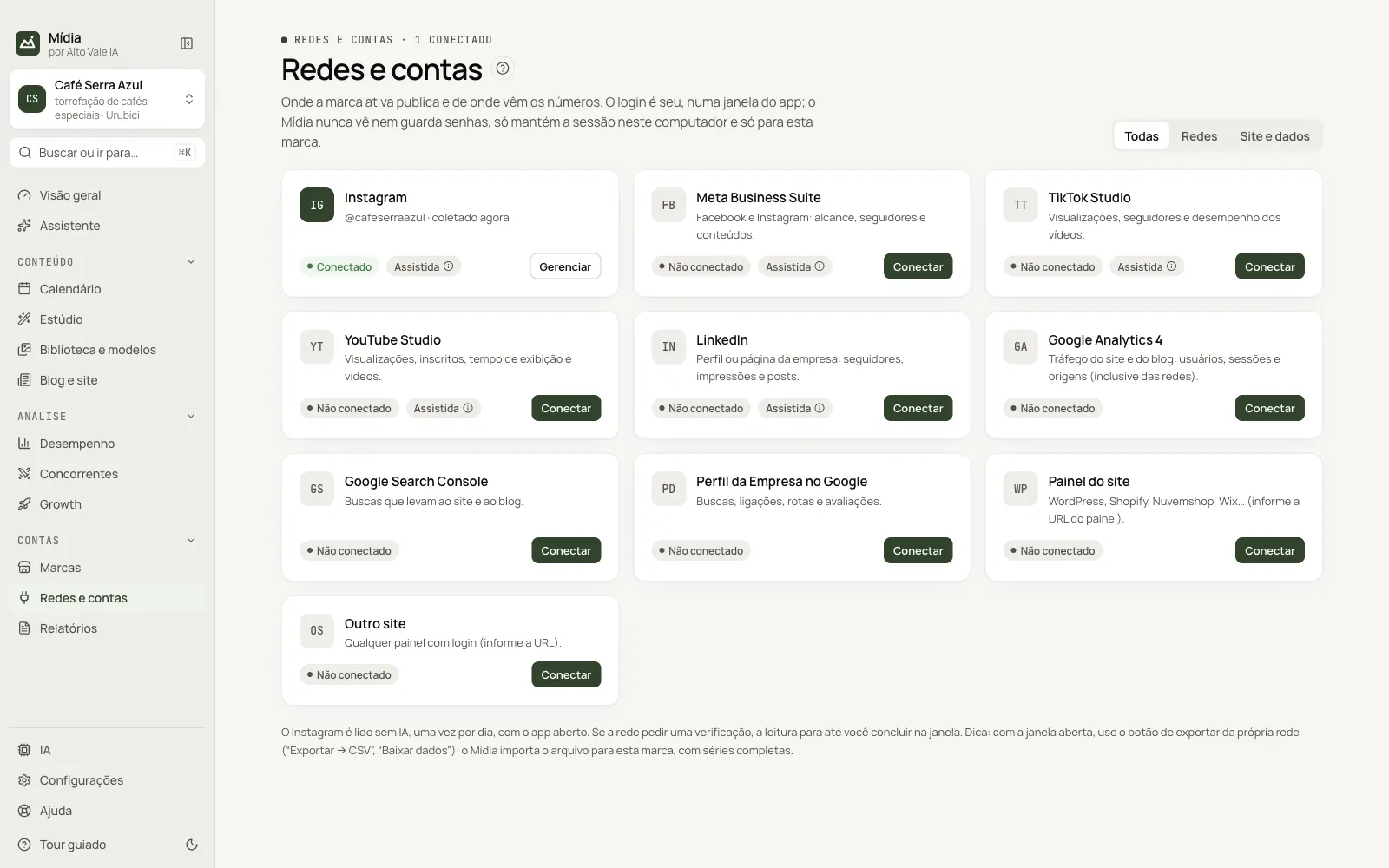
In Redes e contas (Networks & accounts), each network has a card. Click Conectar (Connect) on the network's card and then Abrir e entrar (Open and sign in). A window inside the app opens (nothing opens in Chrome). Log in as usual, with 2FA if any. The window closes on its own when the login is confirmed. The session is saved only on this computer and only for this brand; the app never sees or stores passwords.
| Network | What the collection reads | For the full history |
|---|---|---|
| From the account you signed in with: followers, following, posts, likes, comments and views. Does not use AI | Reach and saves: use Meta Business Suite | |
| Meta Business Suite | Reach, followers and content from Facebook and Instagram | Insights → Export data |
| TikTok Studio | Views, followers and videos | Analytics → Download data |
| YouTube Studio | Views, subscribers, watch time and videos | Analytics → Advanced mode → Export → CSV |
| Followers, impressions and posts from the profile or page | — | |
| Google Analytics and Search Console | Website and blog traffic | Export → CSV |
With the network's window open, use the network's own export button: Mídia imports the file into the brand automatically.
Collect
Instagram: right after the login, Mídia opens the account's profile in a hidden window and reads the numbers the page itself shows, without AI. After that, it reads once a day while the app is open, and this is what builds the follower history. You can turn this off in Configurações → Agendamento (Settings → Scheduling). Hidden likes stay blank, never zero. The result appears in Desempenho (Performance).
Other networks: Gerenciar → Coletar (Manage → Collect), on the account's card, opens the network in a hidden window, reads the pages and uses the AI to turn the text into numbers. In Configurações → Agendamento (Settings → Scheduling), the collection can run every week while the app is open.
Precautions
Automating access may go against the networks' terms and lead to account restrictions. To reduce the risk on Instagram, Mídia:
- only reads your own account, without liking, following or publishing;
- waits 2 minutes between manual collections and makes at most 6 reads per day on each account;
- reads one account at a time.
Gerenciar → Pausar a leitura (Manage → Pause reading), on the account's card, stops reading until you resume. If the network asks for a verification, the status changes to verificação pendente (verification pending) and reading stops: use Gerenciar → Abrir janela (Manage → Open window), complete it and then Gerenciar → Verificar login (Manage → Check login). Mídia never solves verifications on its own. If the login expires, the status changes to login expirado (login expired); click Entrar (Sign in) on the card and sign in again.
Each connection is tied to the account you signed in with. To switch accounts, disconnect and connect again: that way the numbers of two accounts do not get mixed in the same brand.
All the actions on the screen
Todas / Redes / Site e dados filter (All / Networks / Site and data)
Shows only the social networks or only the website sources. Example: "Site e dados" (Site and data) brings Google Analytics 4 and Search Console.
Conectar (Connect)
On the card of a network not yet connected, opens the login in an app window. Example: at Café Serra Azul, click Conectar on Instagram and then Abrir e entrar.
Entrar (Sign in)
Appears when the login has expired: opens the window to sign in again.
Gerenciar (Manage)
Account menu: Abrir janela (Open window), Verificar login (Check login), Coletar (Collect), Ligar a publicação automática (Turn on automatic publishing), Pausar a leitura (Pause reading), Copiar @ da conta (Copy account @) and Desconectar (Disconnect). Example: Gerenciar → Coletar after the first post of the week.
Automática / Assistida badge (Automatic / Assisted)
Shows whether the app clicks publish on its own (Automática) or whether you check and click (Assistida, the default).
Shortcuts
Right-clicking the account's card opens the same menu.
Common problems
"Verificação pendente" (Verification pending). The network asked for a confirmation: Gerenciar → Abrir janela, complete it and use Verificar login.
"Login expirado" (Login expired). Click Entrar (Sign in) and log in again.
See also
Screen in the app: /connections · In the app, press F1 on this screen to open this guide.
Still have a question?
Talk to the Alto Vale IA team on WhatsApp. Tell us the app, the screen and what happened.