Help and tour
Find answers inside the app, see the walkthrough of each screen and reach support.
What it is for
Gathers everything to learn the app and solve questions without leaving it: search, a guide for each screen, shortcuts, glossary and support contact.
Before you start
- Nothing special. To contact support, keep the app open so you can copy the system information.
Step by step
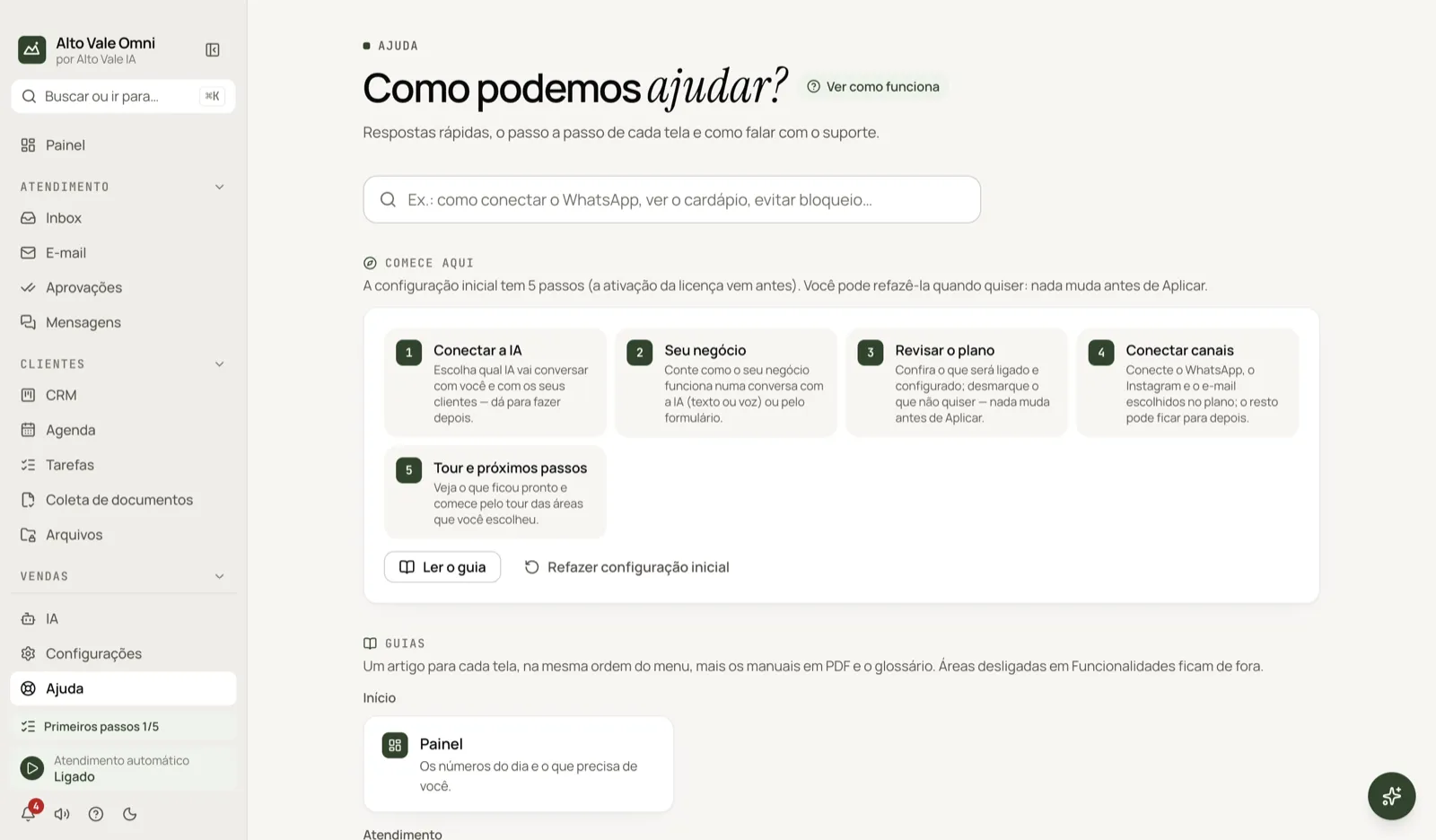
- Open Help in the menu (or press F1).
- Type in Search what you need, for example "how to connect WhatsApp".
- Open the result and use See this screen's tour or Open the screen.
- If you can't find it, click Ask the Assistant.
All the actions
Search help
Each result shows a title, the menu path and buttons to read the article or open the screen. Example: searching "reminder" leads to the Agenda.
Start here
The 5 steps of the initial setup and the Redo initial setup button. Nothing changes before Apply.
Guides (topics by area)
One article for each screen, in menu order. Areas turned off in Settings › Features are left out.
"How it works" tour
Every screen has a How it works (?) button in its header, with 3 to 6 steps. Use Next, Back or the arrow keys; Esc closes. The app remembers which tours you've seen. The General tour walks through the main areas and also lives in Settings › General › Help and guided tour.
PDF manuals
Short guides by type of business, to read or print.
Shortcuts and Glossary
The app's and the Inbox's shortcuts, and the terms explained. Example: the glossary explains "Approval", the AI reply waiting for Marina's release.
Troubleshooting
The most common cases, with action buttons. See also Troubleshooting.
What's new
What changed in the installed version.
Contact support
Shows the contacts and the version. Copy system information copies version, system and license status (no passwords or keys) to paste into the conversation with support.
Shortcuts
- F1 opens Help.
- ⌘J opens the Assistant.
- ⌘K opens the palette (in the Inbox, it searches conversations).
- In the Inbox, ⌘/ shows the full list.
- In the tour: ← and → navigate, Esc closes.
Common problems
Search finds nothing. Try other words or ask the Assistant.
An article "is not available in this version". Update the app in Settings › Updates.
The tour doesn't open by itself. Only the Flows one opens on first visit; on other screens use How it works (?).
See also
Screen in the app: /help · In the app, press F1 on this screen to open this guide.
Still have a question?
Talk to the Alto Vale IA team on WhatsApp. Tell us the app, the screen and what happened.