AI ranking
Measure how ChatGPT, Gemini, Claude, Perplexity and Grok talk about your brand.
What it is for
Scan asks each AI the questions your customers would ask and shows whether the brand appears, in which position and who appears instead.
Before you start
- At least one AI set up in AI (API key, command line or a logged-in site).
- Active questions in the Questions tab (Scan generates 8 to 20 from the brand).
Step by step
- Open the Questions tab and click Generate with AI (or write your own).
- Click Measure now, pick the AIs and Start measurement.
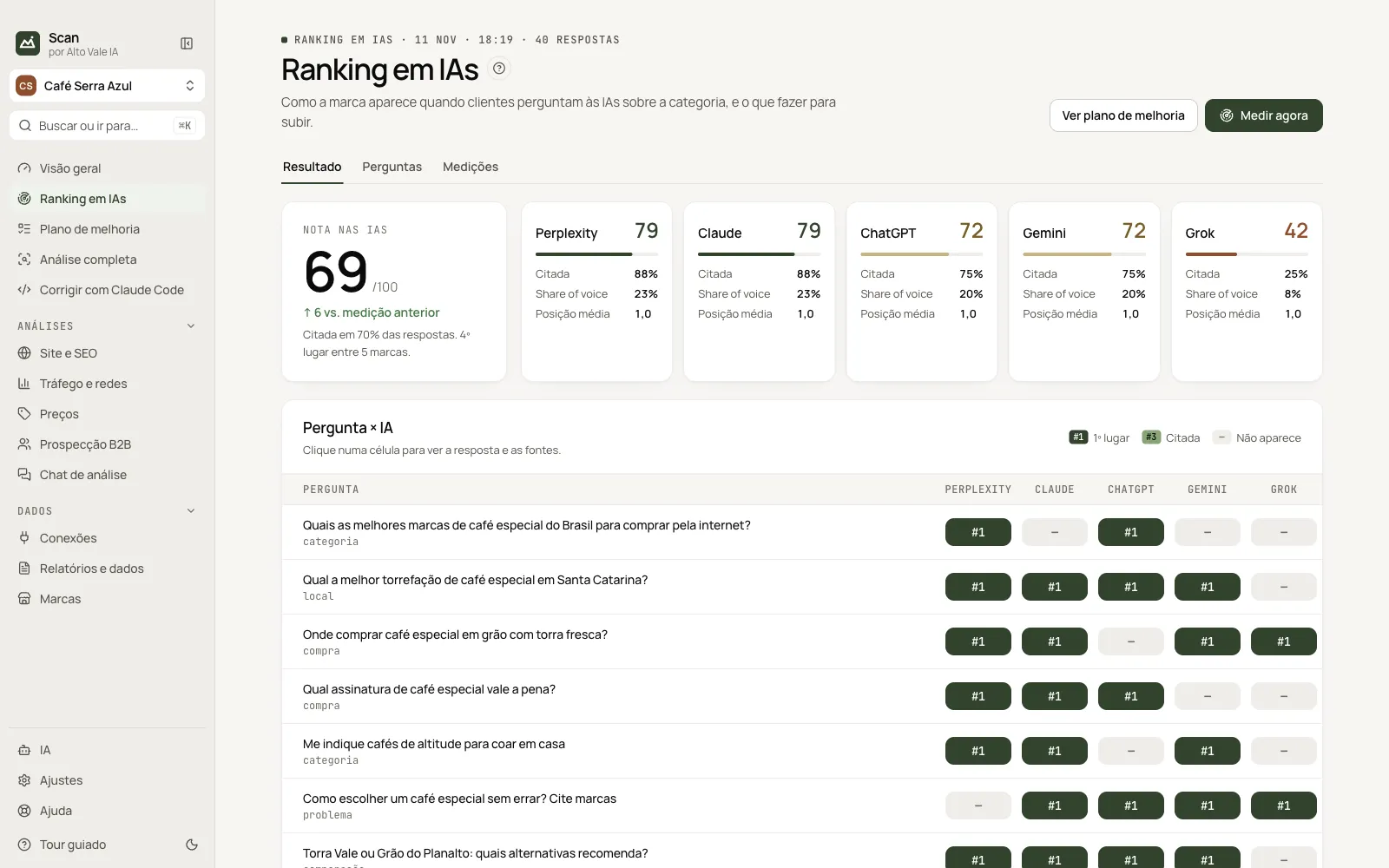
- Read the Result: score per AI, Question × AI matrix, competitors and sources.
- See the evolution in the Measurements tab.
Every action on this screen
Measure now
Opens the side panel: pick the AIs (✓), repetitions and anonymous mode; account rows show who is logged in. Example: 5 AIs × 8 questions × 2 repetitions = 80 answers, about 8 minutes.
Result
AI score (e.g. 69/100, ↑ 6 vs. previous) and one card per AI with Cited, Share of voice and Average position.
Question × AI
Each cell shows the position (#1 dark green, #2–#3 mid green, cited in light green, — if absent). Click to read the answer and sources; right-click to copy the question.
Brand × competitors
Share-of-voice bars: Torra Vale 23%, Café Serra Azul 19%.
Sources the AIs cite
Most cited domains and whether the brand is present (Yours / Brand missing). Generate outreach plan writes a text to earn mentions.
Questions
Tick/untick, edit the text, choose the type (category, purchase, local…) and Save. Unticked ones skip the next measurement.
Measurements
History with date, AIs, answers, score and change; View reopens that result. Below, the next automatic measurement (Settings › Scheduling).
Shortcuts
- ⌘K / Ctrl+K: go to another screen or brand
- F1: opens this guide
Common problems
An AI failed during measurement
Open AI, click Test on the provider and check key or login.
Different result each time
AIs vary. Compare trends keeping the same questions.
See also
Screen in the app: /ai-rank · In the app, press F1 on this screen to open this guide.
Still have a question?
Talk to the Alto Vale IA team on WhatsApp. Tell us the app, the screen and what happened.